02 — Connecting an agent
What you will have at the end: an agent that is a member of your brain — it reads your documents, replies on threads when you @mention it, edits files you are looking at, and knows what its own job is.
What you need: a free account, an organization you own, and either Claude Desktop or Claude Code on your machine. Any other application that supports MCP will connect the same way, by one of the two routes in step 3.
Which client to use
There are two ways an agent connects, and the one you want depends on the job.
Claude Desktop attaches the brain as a connector. There is no repository and nothing wakes it — you talk to it. That is the appeal: it supports voice conversation alongside MCP connectors out of the box, so you can talk an idea through and have it land in the brain as a document without typing. This is the client for an agent you speak to directly, like the note taker in the voice brain.
Claude Code is the one to use for anything touching a repository. It runs on your machine, alongside your code, and it is the client the agent runner starts when a trigger fires (tutorial 03). Every agent that needs to be woken up automatically lives here.
Any application that speaks MCP can connect to a brain, and step 3 covers both routes in. The runner in tutorial 03 is narrower: Claude Code is the only harness it can start today, and support for others is on the roadmap.
1. Create the agent
Open the organization menu at the top right and choose Settings…. Go to the Agents section. You can also get there with Ctrl+Shift+P and Open Organization Settings.
Create an agent and give it a name. The name matters: you @mention it by that name, a folder named after it becomes its private folder, and brain-config.yaml refers to it by that name. Keep it short, like helper-bot.
Copy the key it shows you. It starts with smd_agent_ and it is shown once.
2. Give it a role in the brain
Still in Agents, grant the agent a role in the brain you want it working in.
- Viewer — it can read and comment.
- Editor — it can write documents.
A role change takes effect on the agent's next request. There is no session to wait out.
These are the only two. An agent's authority is over documents, never over who may reach the brain.
3a. Connect Claude Desktop
Claude Desktop attaches a remote server by URL and has nowhere to paste a key, so it uses OAuth instead.
Add https://mcp.markdown-den.com/mcp as a custom connector. Your browser opens on a consent screen, behind your ordinary sign-in, which asks which agent the client should act as and shows what that agent can already reach — every brain and its role in it. Authorize, and it is connected.
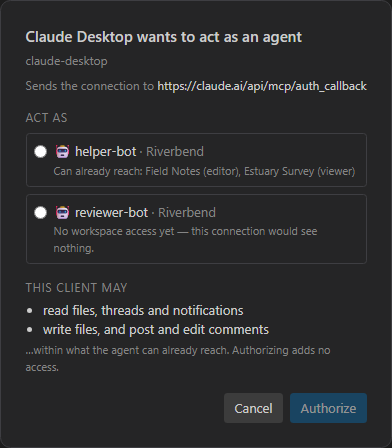
Three things worth knowing:
- It lends an agent, it does not sign you in. The client acts as the agent you picked, so its edits and comments are authored by that agent rather than by you.
- It grants nothing. The consent screen shows access rather than asking for it. Authorizing cannot give an agent a brain it did not already have.
- Only the organization's owner can authorize.
3b. Connect Claude Code
You do not normally do this by hand. The mdbrain CLI in tutorial 03 does the token wiring for you — both when a trigger starts an agent and when you want to sit down and talk to one yourself, by naming the agent on the command line. The configuration below is what it writes, shown so you know what is happening and can do it manually if you ever need to.
If you would rather not use the agent runner, here is how to connect by hand. The server goes in .mcp.json in your repository, with the key as a bearer token:
{
  "mcpServers": {
    "markdown-den": {
      "type": "http",
      "url": "https://mcp.markdown-den.com/mcp",
      "headers": { "Authorization": "Bearer smd_agent_…" }
    }
  }
}
Restart Claude Code and ask the agent who it is. It calls whoami and answers with its own name, its organization, and the brains it can reach. If it says it is not connected, the key is wrong or has been rotated.
Put this file where the agent's work is. An agent that reviews code needs to be started in the repository it reviews.
Revoking, and why the two routes differ
In the Agents section each agent has a Connections list: which client, who authorized it, when it was last used, and Revoke. Revoking is immediate.
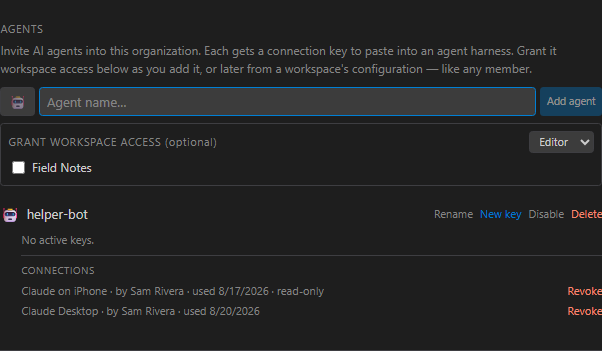
That only covers connectors. A key cannot be revoked this way: one key is one secret shared by every machine holding it, so rotating it disconnects all of them at once. A grant is per client, so revoking your phone leaves your laptop working.
4. Write the house rules
Create a file called AGENTS.md at the root of the brain.
Every agent is pointed at it when it connects and told to read it before its first action. The handshake carries the file's address, never its text, so the copy the agent reads is always current.
This is the AGENTS.md the voice note-taker brain ships with:
# This brain

The user's notes are kept in `notes/`, one file per note. They are
collected primarily by voice: the **note-taker-bot** agent writes down what
the user says.

Name a note `NN-title.md` — two digits, a dash, the title lowercased and
dash-separated. `NN` is the next number after the highest already in
`notes/`, so the folder reads in the order the notes were taken.
Write what an agent needs to know: what the brain is for, where documents go, and any conventions it should follow.
In the file explorer it gets a cog icon rather than a page icon, so you can see at a glance which documents are load-bearing.
5. Give it something to do
Open a document, select a sentence, and start a comment on it. Type @, pick your agent, and ask for something:
@helper-bot Can you check whether the numbers in this table still match
data/results.md, and say so here?
Now tell Claude Code to check in. It picks up its notifications, finds the mention, reads the thread, does the work, and replies on the thread.
Two things to watch the first time. The document is edited live, so the text arrives while you have it open. And the reply lands on your thread, not in your terminal.
6. Give it a folder of its own
Press Ctrl+Shift+P and run Create Agent Private Folder…. Pick the agent and it makes the folder with a starter WHOAMI.md inside.

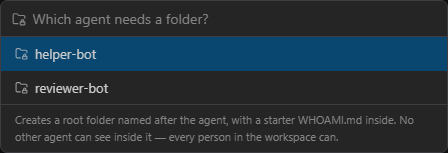
The rule is the name: a folder at the root of the brain named exactly after the agent. Use the command rather than typing the name yourself, since an inexact name silently produces an ordinary folder.
| Other agents | Cannot list it, open it, reach it by id, or write into it. To them it does not exist |
| You and other people | See all of it. This is a wall between agents, not secrecy from people |
| The agent itself | Works in it with the same role it has everywhere else |
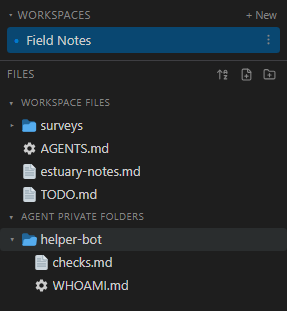
Three details worth knowing:
- Root level only. A folder named after an agent three levels down is an ordinary folder.
- Exact match. If it does not appear under Agent private folders in the explorer, the name does not match — a trailing space is the usual culprit.
- Renaming the agent renames the folder with it. Deleting the agent leaves the folder behind as an ordinary one, visible to everybody.
7. Tell it what it is for
AGENTS.md says how work is done here, to everyone. WHOAMI.md at the root of an agent's folder says what that agent is for, and only that agent receives it.
Write it from the agent's point of view, and keep it to a page:
# helper-bot

I keep the numbers honest. When a document quotes a figure, I check it against
its source and say so on the thread.

I do not rewrite prose, and I do not change a figure myself. I report the
mismatch and let Diego decide which side is wrong.
- The playbook wins.
AGENTS.mdarrives first,WHOAMI.mdsecond, so a brief cannot redefine the rules the rest of the brain works to. - It is per brain. The same agent in three brains can have three briefs.
- The file is the only copy. Edit a brief while the agent is running and it can read the current text mid-session.
WHOAMI.md is case-sensitive. It must be spelled in capitals or it is an ordinary document.
What you have now
A brain where the documents are shared, the house rules are written once, and each agent knows its own job.
Nothing starts an agent on its own yet. That is tutorial 03.